The Briefs
This assignment came in two parts — Project 1a and Project 1b — released a week apart, each with its own brief, deadline, and curveballs.
Project 1a was simple on paper: partner up, interview each other about your interests, and design a simple mobile app solving a problem rooted in them. The constraints: everything hand-sketched, completely greyscale, with evidence of the full process — research, problem statement, user flow, rough sketches, multiple solutions.
Then Project 1b arrived — an unexpected surprise! Four days (one swallowed whole by presentations) to interview multiple additional users (I interviewed a further six!), consolidate everything into a SINGLE persona, and turn the research into digital greyscale wireframes and a clickable Figma prototype — then test it. The kicker: NO user onboarding screens permitted. The app had to be intuitive enough for anyone to pick up and run with.
Challenge accepted!
Fair warning: this project has as many twists and turns as a Lionel Messi dribble through the opposition’s box before scoring. So, buckle up and enjoy the ride! This is a user-led tour de force — the stuff UX dreams are made of. Enjoy!
Let’s Crack On... Oh, Wait!
Project 1a paired me with a coursemate, Eva. The goal: find out each other’s interests and solve a problem for one another via a mobile app. Our first stop was a quick five-minute call to touch base — the plan was to have a quick chat to find out about their hobbies and interests and any roadblocks, sleep on it, then reconnect the following day for a longer interview session to flesh things out. And that’s where I hit my first issue: my counterpart hasn’t got time for interests. This marks the start of the many twists and turns that lay ahead.
Meet Christina
From here on in, I’ll refer to Eva by her persona name: Christina. Every interview in this project was with a real person, and every quote is theirs.
The next day, we got back on the phone — this time for a proper interview, about her lists and how she keeps organised.
Christina, 27, recently moved to London; she’s a mother and primary carer of a toddler. She’d purchased an unfurnished property and was in the process of ordering furniture. If that isn’t hectic enough, she’s started a professional design course. She writes lists to keep organised.
When I dug into how, the scale surprised me. She makes 10–20 lists per week, scattered across three mediums: Apple Notes on her phone, the Stickies app on her desktop, and good old pen and paper. She reviews and merges them about once a week. She finds it “crazy” and “wild” trying to keep track of it all — and she fears losing lists.

From Transcript to Affinity Map
I transcribed our interview, highlighting the key statements, then mapped them out to look for patterns. Things then started to become a little clearer. My process was as follows:
Transcribe — the full interview, verbatim.
Highlight — key statements.
Cluster — no predetermined categories; let the patterns reveal themselves.
Name the patterns.
This was my working affinity map from the interview — every highlighted statement, clustered as the themes emerged.
Christina — Interview 01
List-making & organisation
From there it was a process of filtering and distilling. I merged the duplicates, dropped the noise, and grouped what was left until the raw capture settled into six clusters — and from those, the three patterns that would drive every decision thereafter.
Frequency
10–20 lists a week. This isn’t occasional admin — it’s a constant, daily reflex.
Fragmentation
Three mediums, none trusted to hold everything. The self-organising is itself the burden.
Emotional driver
Anxious → calm. The list is a pressure valve, not a task tool. This is the one that turned the project.
Christina, 27
A persona is a decision-making proxy. Every call from here on would be tested against her.
Christina (persona name for Eva)
Mother and primary carer of a toddler, freshly moved into an unfurnished London home and has started on a professional design course. Tech-savvy, but has yet to find a system that holds her lists. She writes to keep organised — and, more than that, to stay calm.
Goals
One place to capture and organise everything, so nothing important is forgotten.
Behaviour
10–20 lists a week across Apple Notes, Stickies and paper. Reviews and merges weekly.
Pain points
Loses lists. Finds tracking three mediums “crazy, a bit wild.” Fears forgetting.
Emotional driver
Anxious → calm. The list is a pressure valve, not a to-do tool.
“Once I write my list, I feel like it’s under control. I can then turn away and focus on something else.”
Christina is a mother who needs a better way of creating and organising her lists, because of an anxiety she may forget something important — which could have bad consequences for her family.
The Word That Turned the Project
When I asked Eva (persona name: Christina) what she felt before writing a list, and what she felt after:
It’s anxious to calm. Anxious to focused. Once I write my list, I feel like it’s under control. So I can then turn away, I can focus on something else and I know that everything else is gonna be okay.
Her lists weren’t tasks. They were a pressure valve. In her own words, her lists are “more about capturing what’s going on in my head” — “almost like a conduit for stress.” She told me she hates reminder apps: “the dinging on my phone and its notifications is too much.”
So I feel like nothing’s ever gonna get lost. Nothing’s ever gonna get forgotten about — as opposed to really committing me to doing that thing.
Going through the transcripts, creating the persona, and trying to summarise the need — to make sense of it all — only one word fit. It changed everything:
Tranquil.
It became the persona’s job to be done — the axis of every decision that followed:
I want to be Tranquil.
One line stayed with me: “I feel like I can’t focus when I’ve got all these thoughts in my head.” With the persona standing, I mapped her journey — the emotional arc of a single note, from anxious trigger to calm reflection.
Journey maps earn their keep by locating the emotional lows — that’s where the design has to work hardest.
The emotional arc of a single note — anxious to calm, and one last dip.
Tracing one of Christina’s (Eva’s) notes from the moment a thought intrudes to the point she’d consider sharing it. Journey maps earn their keep by locating the emotional lows.
Christina (Eva) · 27 · mother & primary carer · 10–20 lists a week across three mediums.
Feels anxious about forgetting; decides to make a list. Anxiety building — fear of losing context.
“Every time something pops into my head, I have to record it.”
Chooses a platform (paper / app / phone); writes thoughts down; adds to existing lists. A conduit for stress.
“It’s anxious to calm, anxious to focused.”
Reviews, merges, prioritises — about once a week. Neutral, a little effortful.
“It can get a little crazy, a bit wild.”
References lists for tasks; completes items; feels in control.
“Once I write my list, I feel like it’s under control. I can then turn away and focus on something else.”
Feels calm and organised, then a sharp drop — she’s embarrassed to show her lists.
“I feel like my lists are stupid.”
And out of all of that came my How Might We:
How Might We create a note-taking solution that reduces anxiety and allows for easy organisation?
The Research Detour
Being from a Product Management background, understanding how Christina behaved was only half the equation. The why evoked my curiosity. Was “lists reduce anxiety” just Christina — or a real, documented phenomenon? I went looking. It turns out the relief she described has a substantial evidence base, and the consistent thread across all of it is the same: the benefit comes from offloading what’s in your head, not from completing a task.
Expressive writing measurably reduces anxiety and stress
A meta-analysis of expressive-writing interventions found a small but significant effect on reducing symptoms of depression, anxiety and stress — the “conduit for stress” Christina described, validated at scale.
Guo (2022), British Journal of Clinical PsychologyJuggling multiple tools is itself a source of stress
Switching between fragmented digital tools increases cognitive load and stress — which means Christina’s three-medium system (paper, Stickies, Apple Notes) may be adding to the anxiety it’s meant to relieve.
Mark, Gudith & Klocke (2008), University of California, IrvineWriting worries down before bed helps you fall asleep faster
In a polysomnographic study, participants who wrote a pre-bed to-do list fell asleep significantly faster — about nine minutes — than those who listed completed tasks, and the more specific the list, the faster the onset.
Scullin et al. (2018), Journal of Experimental Psychology: General · Baylor UniversityUnfinished thoughts keep intruding until you capture them
The Zeigarnik effect: the mind holds onto incomplete tasks. But simply making a plan to deal with them — writing them down — eliminates the cognitive nagging, even before anything is done.
Masicampo & Baumeister (2011), Journal of Personality and Social PsychologyPeople who keep formal written lists tend to be more conscientious
Research on to-do list use found that those who keep formal, written lists rank higher on conscientiousness — capture as a trait of how organised, deliberate people manage a busy mind.
Pychyl (2020), Psychology Today, “Do To-Do Lists Work?”Clinicians prescribe exactly this
CBT-I (the gold-standard insomnia therapy) recommends scheduled “worry time” — writing down concerns and next steps to reduce bedtime rumination. The behaviour my users invented for themselves is evidence-based practice.
NHS Every Mind Matters · CBT-I clinical guidanceMy research takeaway: the relief is real, and it comes from capture itself — offloading the mind — not from ticking things off. List creation reduces anxiety and reflects how conscientious, deliberate people manage a busy mind. The science settled the why.
Alongside the reading, I spent my evaluation window getting hands-on — putting the leading note-taking, journalling, mindfulness and productivity apps through their paces. Brief by necessity, but wide on purpose: I wanted to feel where each one helped, where each one got in the way, and which conventions were worth keeping or breaking.
Sources & further reading
- Scullin, M. K., et al. (2018). The effects of bedtime writing on difficulty falling asleep. Journal of Experimental Psychology: General, 147(1), 139–146. · Baylor press
- Masicampo, E. J., & Baumeister, R. F. (2011). Consider it done! Plan making can eliminate the cognitive effects of unfulfilled goals. JPSP, 101(4), 667.
- Guo, L. (2022). The delayed, durable effect of expressive writing on depression, anxiety and stress: a meta-analytic review of studies with long-term follow-ups. British Journal of Clinical Psychology, 62(1), 272–297.
- Mark, G., Gudith, D., & Klocke, U. (2008). The cost of interrupted work: more speed and stress. Proceedings of CHI 2008, 107–110.
- Pychyl, T. (2020). Do To-Do Lists Work? Psychology Today.
- Harvard Health (2017). Write your anxieties away. · UC Berkeley Greater Good: How journaling can help.
- Carroll, R. The Bullet Journal Method.
The Colour Conversation
One exchange from Eva’s interview deserves its own spotlight — because it becomes a time bomb later in this story. I asked about her perfect app: “It would sync, like Apple Notes, across devices. But it would be displayed differently... almost like stickies and notes bundled into one.” Organised by colour, or by hashtag? “Yes. So by colour, yes.”
So I floated an idea: chakra colours — home could be your heart — with hashtags nesting underneath: #livingroom, #bathroom, all still falling under home. Eva lit up and ran with it:
Now that you mention it... I think that that’s a great idea. I was actually thinking about that the other day... you could go hashtag home, hashtag living room, hashtag urgent. Or hashtag home, hashtag living room, hashtag wishlist.
Colour wasn’t decoration. Colour plus hashtags was the organising soul of the concept — born live, in the very first interview. Remember that.
Torn: Productivity or Mindful?
Following my interviews with Christina (Eva), and doing my own research, I found benefits like reduced anxiety and stress — an area I know first-hand from bullet journalling myself — along with others such as improved sleep through cognitive offloading. We’d discussed things like chakra colours. Now I had to figure out, in my own mind, how to design this.
Really, with every ounce of me screaming this is a mindful app — for all intents and purposes it was a productivity app, with mindful benefits as a by-product. I was torn between the two. And I had to decide, one way or the other, to be able to frame it and start thinking in design.
The User Flow That Answered It
a list
am I?
note
Every path ends in review → collate, action or archive.
Map what people do, not what they say — flows expose what interviews can miss.
So, to get a clearer picture, I drew up a user flow of how Christina actually went about things — in the hope it could determine which space I’d be entering. At home she reaches for the Stickies desktop app; out and about it’s Apple Notes; no phone battery, it’s paper and pen. Notes are later reviewed, collated, archived or actioned.
And then I saw it. Plotted out in front of me, in her own behaviour, the thing no interview had said out loud:
No calendar. No reminder. No call to action. Anywhere.
I was so happy at that moment of realisation. My hunch was right — and here it was, drawn in black and white: she wasn’t living in the productivity space at all. This was mindfulness, 100%. The whole project, which had felt like it had ground to a halt until that decision, had direction, verve and movement again — and a diagram had handed it to me. I was delighted!!
Question answered — by a diagram. There it was, the gap nobody held: no app treats note-taking itself as the mindful act, the calm of journaling with the immediacy of digital capture. That one user flow map saved me from building yet another to-do clone in a market already packed with them. And demographics? Unimportant — this behavioural pattern showed up regardless of who you were.
Then I went looking for inspiration. I must admit, the mindful space — journalling in particular — was already an interest of mine, and it rang true with Christina too. On my shelf sat the Bullet Journal book, and inside it a quote stopped me:
Many painters are afraid of the blank canvas, but the blank canvas is afraid of the painter who dares and who has broken the spell of “you can’t” once and for all.
— Vincent van Gogh — found in The Bullet Journal Method
A blank canvas is very much like a blank physical page: somewhere to get your thoughts out. This app would have to be as stripped down and straight to the point as possible — easy to pick up, hassle-free, an almost Zen experience. I also started thinking the notes could be colour-coded.

First Sketches
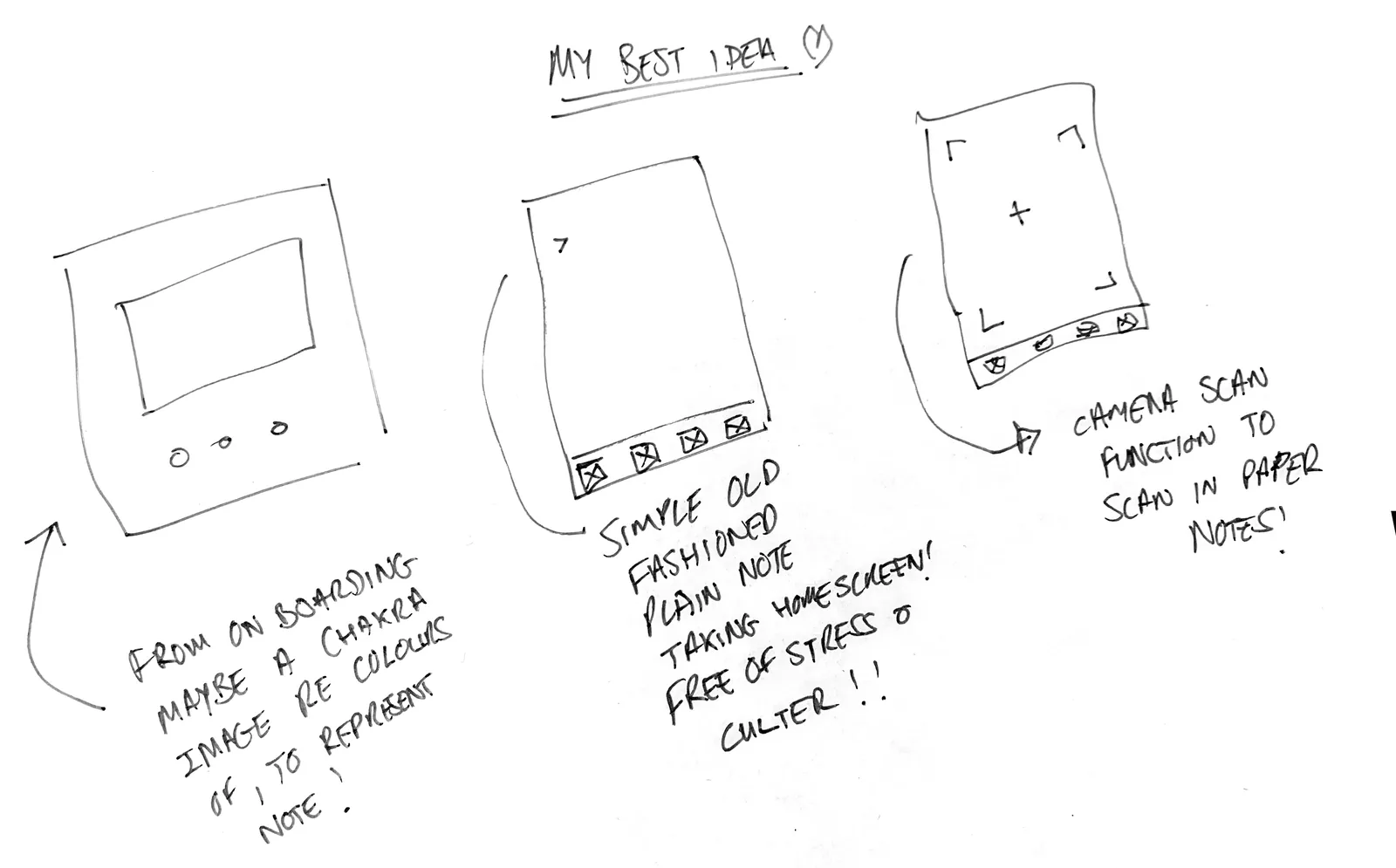
My best ideas from the 1a sketching rounds:
A simple, old-fashioned, plain note-taking homescreen — free of stress and clutter.
Onboarding built around the chakra-colour system straight from Eva’s interview — home = heart — so colours carry meaning when organising notes.
A camera scan function to pull paper notes into the app.
The app opens straight onto your notes, sorted by date — an “old skool Filofax” feel!
Multiple directions, one shared principle: capture first, organise gently, never nag.
Project 1b: The Plot Twist
The 1b brief, in full: a surprise follow-on to 1a, four days on the clock (Friday being presentation day). Interview multiple users (I interviewed six) about the problem you’re seeking to solve (from last week), consolidate them into a single persona, and design a clickable digital prototype tested with real people. The catch wasn’t the timeline — it was the constraints that came attached.
And the new brief came with a bomb: GREYSCALE. The clickable prototype too — not a drop of colour permitted. My immediate thoughts went to my chakra colours; they were foundational to the whole project, the organising soul of the concept, and Eva had lit up about them. My mind flooded: did anyone really watch snooker in the black-and-white TV era? Followed by — well, I suppose I’m still allowed to think in colour. And then, the relief: there are, allegedly, Fifty Shades of Grey — so I’d heard. It would have to survive in shades of grey. Challenge… re-accepted!
And beneath the panic, a quieter thought: strip the colour — if the information architecture is solid, it should work without it. The brief was accidentally the perfect stress test of the system Eva and I had built.
A finale bomb was hiding in the brief, and it nuked my plans: NO ONBOARDING. The app had to be intuitive enough for anyone to use without any prior explanation.
I’d planned a swipe-to-open menu — keeping the user on a blank, distraction-free Zen page to write in, with the tools tucked away off-screen.
But when the brief banned onboarding, it didn’t just remove a tutorial — it killed the swipe. A hidden gesture no one can teach is a gesture no one will find.
Yet another constraint and another challenge — accepted!
My Brief Reaction
The new brief meant my one-person insight now had to survive contact with more users — and more interviewees would resurrect the Productivity vs Mindful debate, with every chance of swinging it toward productivity. The potential for a very un-Zen Notes? Before I pulled out my Filofax, I set my criteria: people who intentionally record notes or make lists at high frequency. I kept it deliberately open — because at this stage the project could still tip either way. I had to stay unbiased; this is a UX project, after all.
So I blasted a quick message out to my contacts, asking a simple question: do you routinely make notes or lists — is that actually a habit of yours? Whoever came back a yes, I lined up for an interview. A wide net, cast fast. Fate would sort the rest.
Before the verdict: meet the final six interviewees.
The Unusual Suspects
CLAUS, 29 — Actor & Barista
SAM, 29 — Architect Turned Student
ALEX, 40 — Accessories Designer
CHRIS, 51 — Infrastructure Engineer
HEMANT, 45 — Account Management
STIPICA, 48 — Senior Product Manager
3–2 Down in Stoppage Time ...
After five interviews, with one more scheduled, it was 3–2 to productivity. Not only had the brief dropped bombs on the very idea of Zen Notes — my respondents were following in the same vein.
On one side, the mindful capturers: Claus and Sam, high-frequency and fragmented, capturing to feel calm. On the other, the professional organisers: Chris, Hemant and Alex — work-led, enterprise tools, already served well enough. Two votes mindful, three votes productivity.
The turnEnter the Accidental Hero: Stipica
The last interview was Stipica, 48, a senior product manager — and here’s the twist: he levelled the score for a product he himself would never use. He makes only around three notes a week, and he’s calendar-first. On paper: a vote for productivity. But look at what he actually schedules: “reading for 10 minutes... meditation for 15 minutes... bike ride... hike with friends.” By his own count, four out of five of his entries are mindful — appointments with himself. And he doesn’t trust notes apps to surface things either; the calendar’s fixed slots and alerts “ease out your mind.” His trick wasn’t mindfulness reminders — it was mindfulness scheduling. His parting thought said it all: where notes meet calendars, there’s room for improvement. 3–3.
Deadlock. So the deciding vote was mine — and it wasn’t close. This wasn’t about personal bias; it was about business logic and addressable market size. The productivity three were business-case users: enterprise tools at work, little capture outside the office. One of them declared he was perfectly happy in the Apple ecosystem. Mindful it is.
One last cut remained. Stipica had swung the vote, but at roughly three notes a week he was far too infrequent to be a target user himself — so he was dropped, with thanks. And in his place, Eva came back in. The persona would be built from Sam, Claus and Eva (Christina) — and the target users handed me two findings I hadn’t anticipated:
2 of 3 complained Apple Notes was “just one long list of things” and hard to find entries in.
3 of 3 used their calendar app for reminders — because they did not trust their notes app to notify them.
Four Pain Points, One Pattern
Across all seven interviews, the frustrations clustered into four named problems:
The “one long list” problem. Notes apps as an endless scroll. “It’s basically just like a list and then you just write forever... there’s no hierarchy” (Sam). “It’s just one big text and you just add it to the bottom” (Alex).
The calendar duplication tax. 3 of 3 target users manually duplicated important notes into a calendar, because notes apps can’t be trusted to resurface anything.
The lost notes problem. Christina: “often things do get lost.” Alex constantly loses paper notes. The fear of losing a thought is itself a source of anxiety — the very thing capture is meant to relieve!
Fragmentation fatigue. Christina across three mediums; Claus keeping the same list in three places; Alex split between paper, Apple Notes and Notion — “there’s a lot of options out there, but none of them are all integrated.”
Four symptoms, one diagnosis: capture is easy everywhere, but trust is nowhere. Across so many solutions, the self-organising itself became the burden — a perpetual negative feedback loop, leading to a feeling of unease. What that missing trust actually was, and why the calendar kept reappearing, is the discovery of the next chapter.
The Calendar Paradox
This one perplexed me. In the first part of the project, the absence of a calendar is what ushered me into the mindful space — mindfulness had crawled back from 3–2 down to draw level at 3–3, then held its nerve to win on penalties. And now here I was, about to add a calendar to a mindful app. But this time it felt right — because this time the users were the ones asking for it. Listen to them:
I don’t trust myself to look at it when the time is right... It needs to pop up when it is relevant.
— Sam, 29, architect
Sam’s example says it all. He’d signed up for a Deliveroo free trial and needed to cancel within two weeks: “I’m not gonna write that in my notes because I don’t trust myself to look at it when the time is right. So I put it in capital letters in my Google Calendar the day before — cancel subscription” — plus an alert. He even uses his notes app for self-therapy: “I’ll actually give therapy to myself... writing my thoughts out helps me dissect my own feelings... my mind is a bit more clear. I can go to sleep quicker.”
Claus, 29, an actor and barista with ADHD, keeps the same daily list in three places — a whiteboard in his room, the Things app pinned to his lock screen (“every time I open my phone, the list is there”), and a notepad in his bag. “Whatever room I’m in, I’ve always got that list on me in some capacity.” Before the list, anxiety: his day is “so open and so unstructured that that kind of puts a little bit of unease within me.” After: “I can see that it’s in manageable steps... more at peace with myself.” Meanwhile thousands of Apple Notes hold his song ideas, joke ideas, scene ideas — and he deliberately keeps idea-space and task-space separate, so everything has its place.
Even the satisfied users build it by hand. Hemant’s system for anything complex — a visa application, say — is a calendar entry with a reminder two weeks ahead, while the supporting detail lives in Notes. A note and a calendar entry, manually stitched together across two apps. “Simple like that.” He’d hand-built the exact link Zen Notes automates — and he isn’t even in the market.
And here was the paradox. In 1a, Christina’s user flow told me: no calendar, no calls to action, no notifications — she hates the dinging! In 1b, my target users told me: we duplicate everything important into a calendar, because we don’t trust notes apps to surface things.
These findings look contradictory. They aren’t. Nobody wanted productivity pressure. Everybody wanted trusted surfacing. The calendar wasn’t a productivity tool to these users — it was simply the only place a note could be trusted to come back at the right moment.
Worth spelling out plainly: my 1a concept had no calendar at all — correctly, for Christina. It was these interviews that put one back in. The calendar returned — but transformed.
The design answer wrote itself: a calendar that exists only through notes. Optional. Never required. No nagging. Surfaces on your lock screen — you’re welcome, Claus.
Amy Tan
Meet Amy — a persona created, as the brief required, from Eva (persona name Christina), Sam and Claus. Her demands and requirements are theirs, consolidated into one person. It is on Amy that I base Zen Notes on herewith — very much in the Mindful space!
Amy Tan, 27 consolidated 1b persona · synthesised from Eva, Sam & Claus · Dalston
Amy’s life is soo open, hectic and unstructured, and she uses multiple apps to try to keep up with it. A thought lands many times a day — a stand-up sketch, a place a friend mentioned she wants to check out, a task to remember — and she captures it straight away to feel calm. But when an important note won’t resurface later, feeling disorganised only adds to her unease.
Goals
Capture any thought instantly and trust it will resurface at the right moment — without juggling three apps.
Behaviour
Captures snippets multiple times a day; lists places and nights out to check out, continually; duplicates anything important into a calendar so it can’t be lost.
Pain points
Notes are “one long scroll” with no hierarchy; she doesn’t trust them to surface things when relevant, so everything ends up duplicated.
Emotional driver
Anxious → calm. Capture brings instant relief; a lost note brings the anxiety back worse.

JTBD
“I want to take control of my life!”

Mission statement
Zen Notes has to capture every thought the moment it lands, resurface it exactly when it’s needed, and let it be retrieved without a second thought. The stress of capture will be a thing of the past.
Designing Zen Notes
Greyscale. Digital wireframes. A clickable Figma prototype. Every screen had to pass a single test:
Does this help Amy capture a thought instantly, retrieve it easily, and not miss anything important?
Underneath the eight screens runs one idea that holds the whole product together. Start there.
The spine: one note, one shade, everywhere
When you save a note you assign it a (editable) type. The type is a tonal shade — my answer to the greyscale bomb. There can be colour in grey. That shade then colour-codes the note everywhere: on the grid tiles, in the list, on the calendar. Five tones stood in for the chakras, carrying meaning until colour was allowed back. In the walkthrough below, Event is ticked.
Light to dark, Self to My Book. The shade is the through-line — watch it travel.
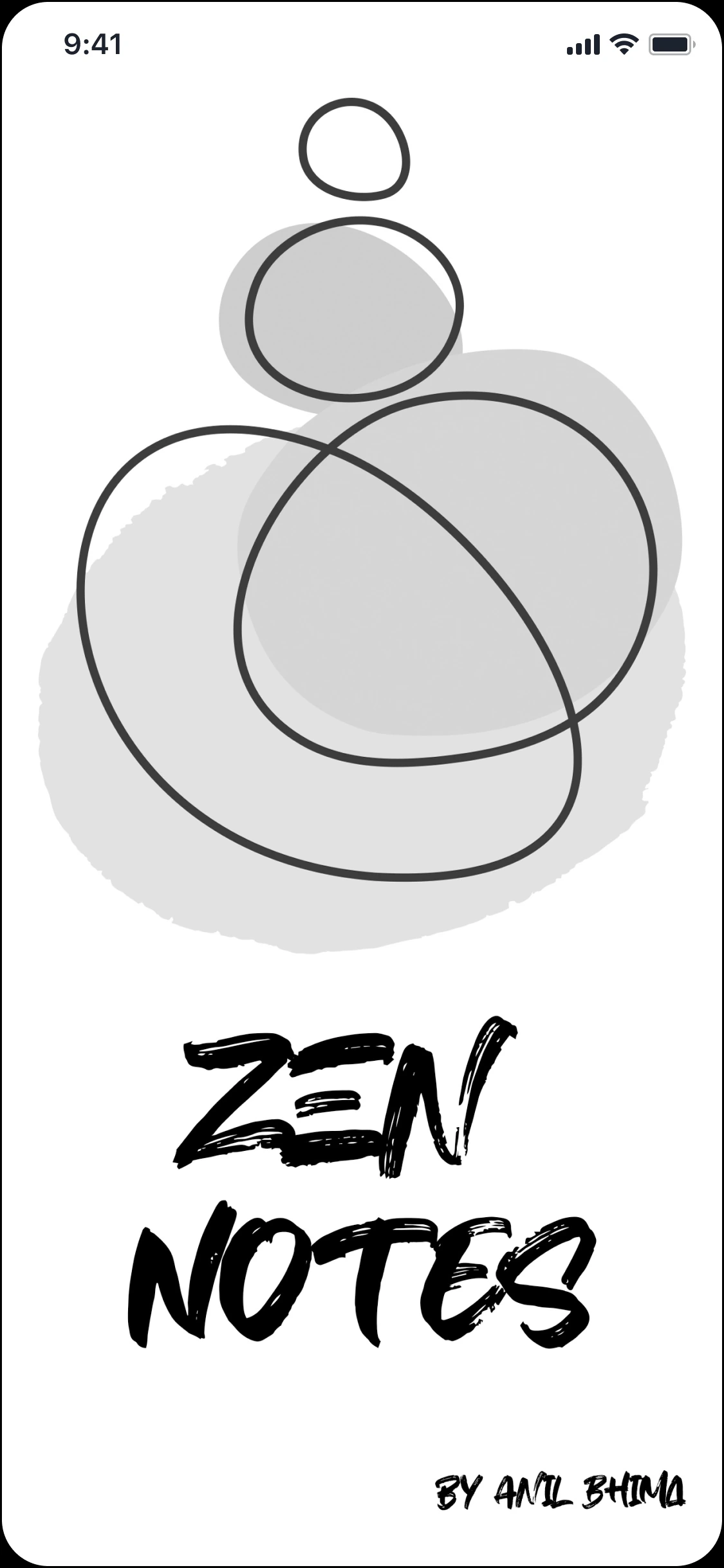
A calm front door
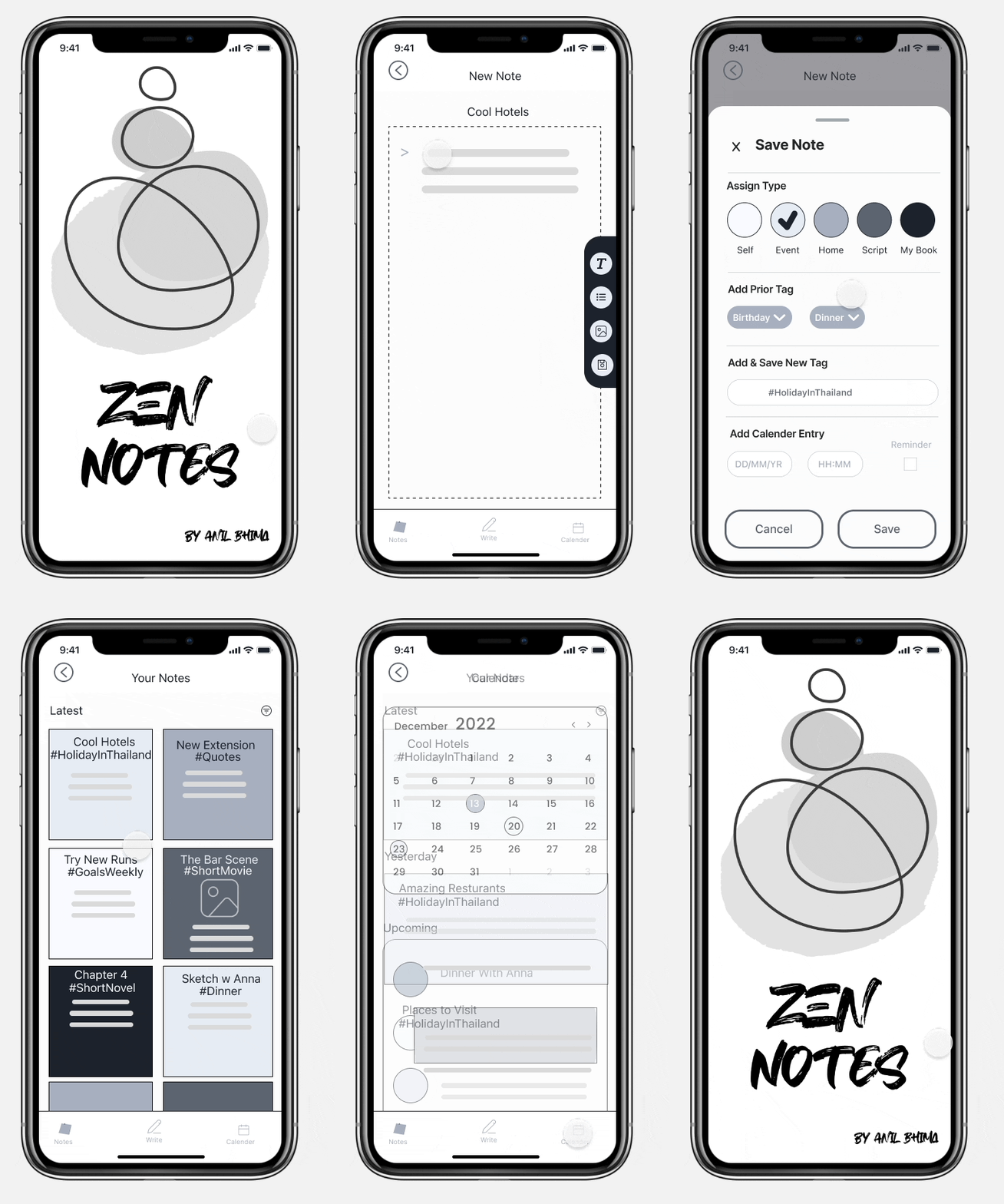
Ensō circles and a hand-brushed ZEN NOTES mark. No sign-up wall, no feature tour — the tone is set before you’ve done anything.
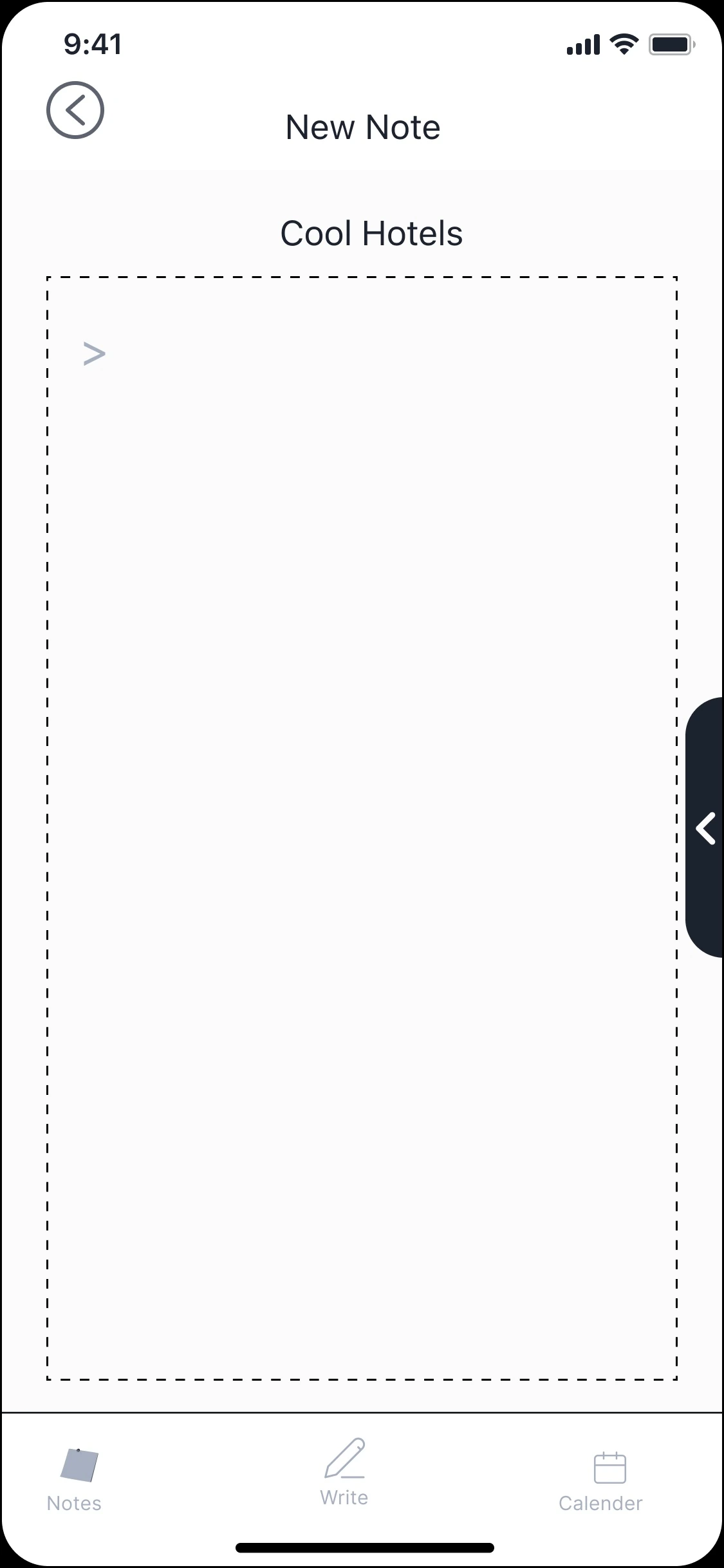
The app opens on a blank note
No dashboard. No inbox of everything you haven’t dealt with. The first thing you see is a place to write — here, a note titled Cool Hotels. Capture is the homepage.
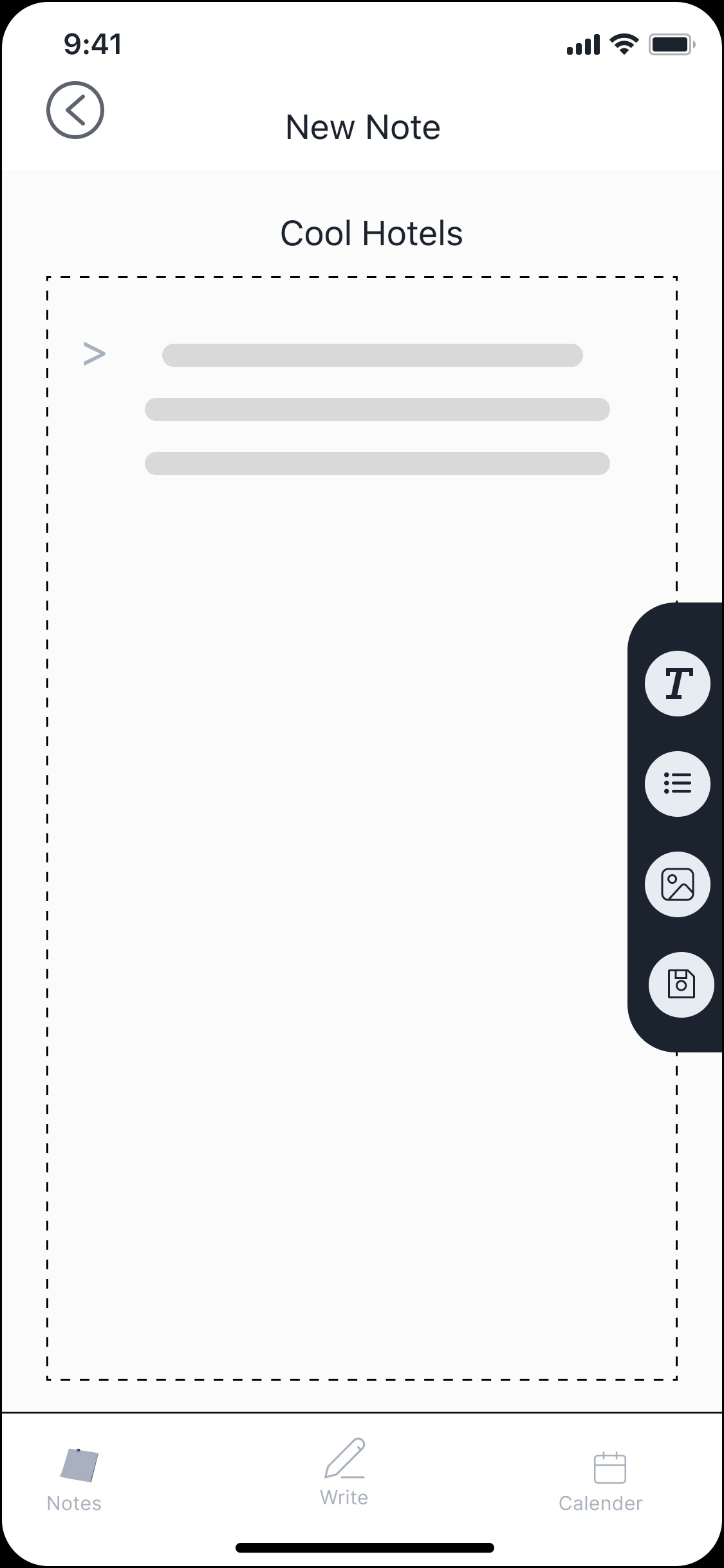
Tools stay out of the way
Write your note or list, then press the button at the middle-right edge to open a small toolbar — text, list, image, save. The menu only appears when you request it.
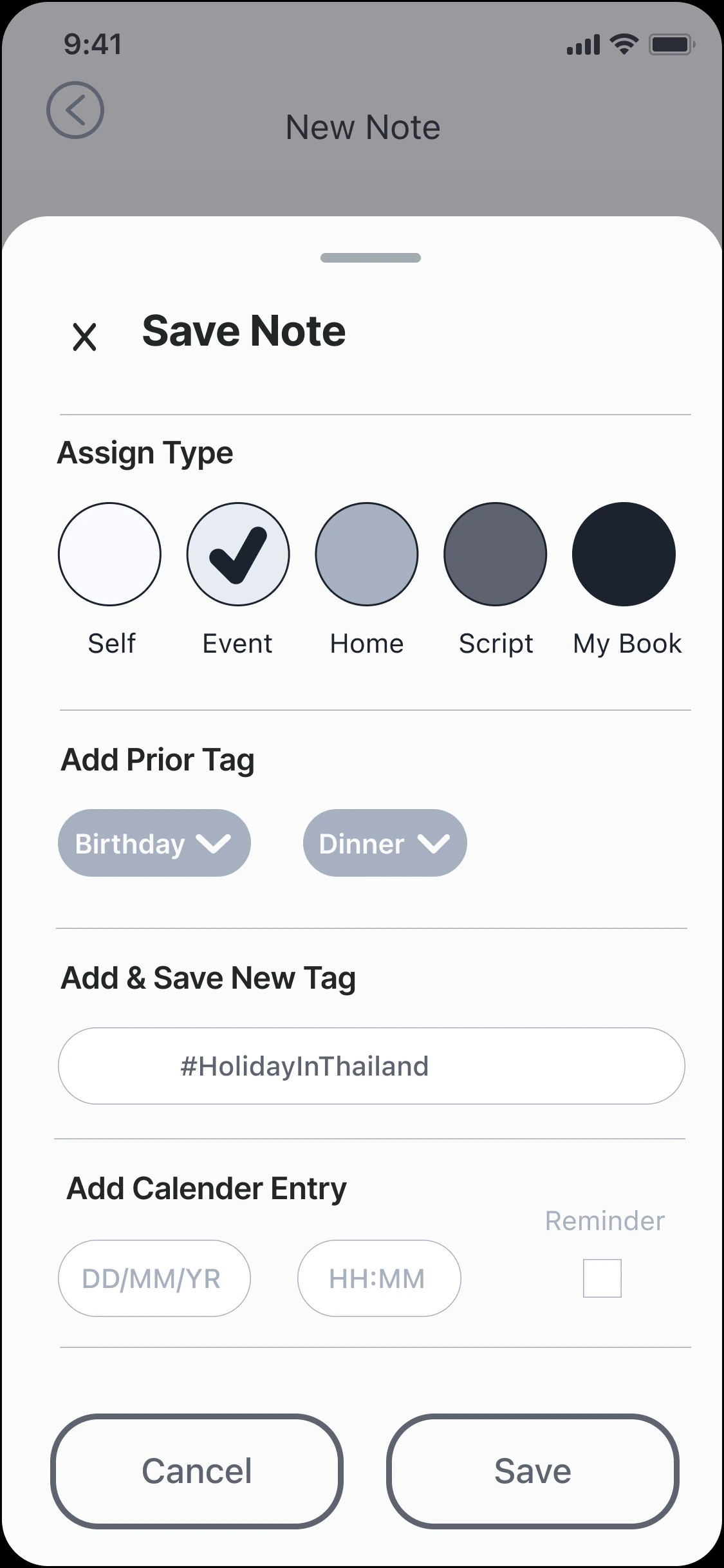
Where the gentle organising happens
Assign the note category (you can set these according to a colour code of your liking). Then add a tag (or reuse an existing). Finally — only if you want it — Add Calendar Entry: a date, a time, an optional reminder.
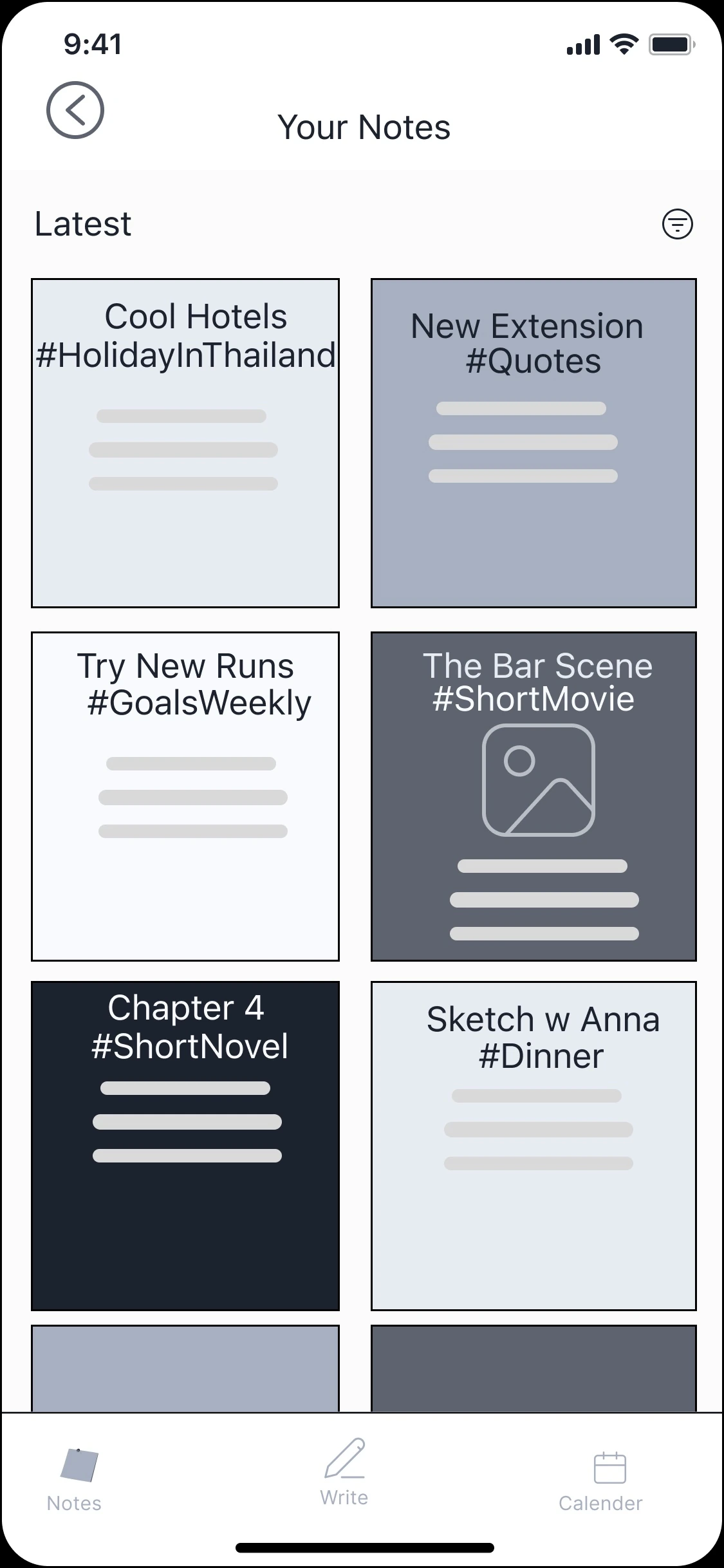
Notes become a scannable grid
Entries appear latest-first as visual cards, each with its own Type Shade and hashtag. Sam and Alex both said Apple Notes felt like one endless wall of text. This is the opposite.
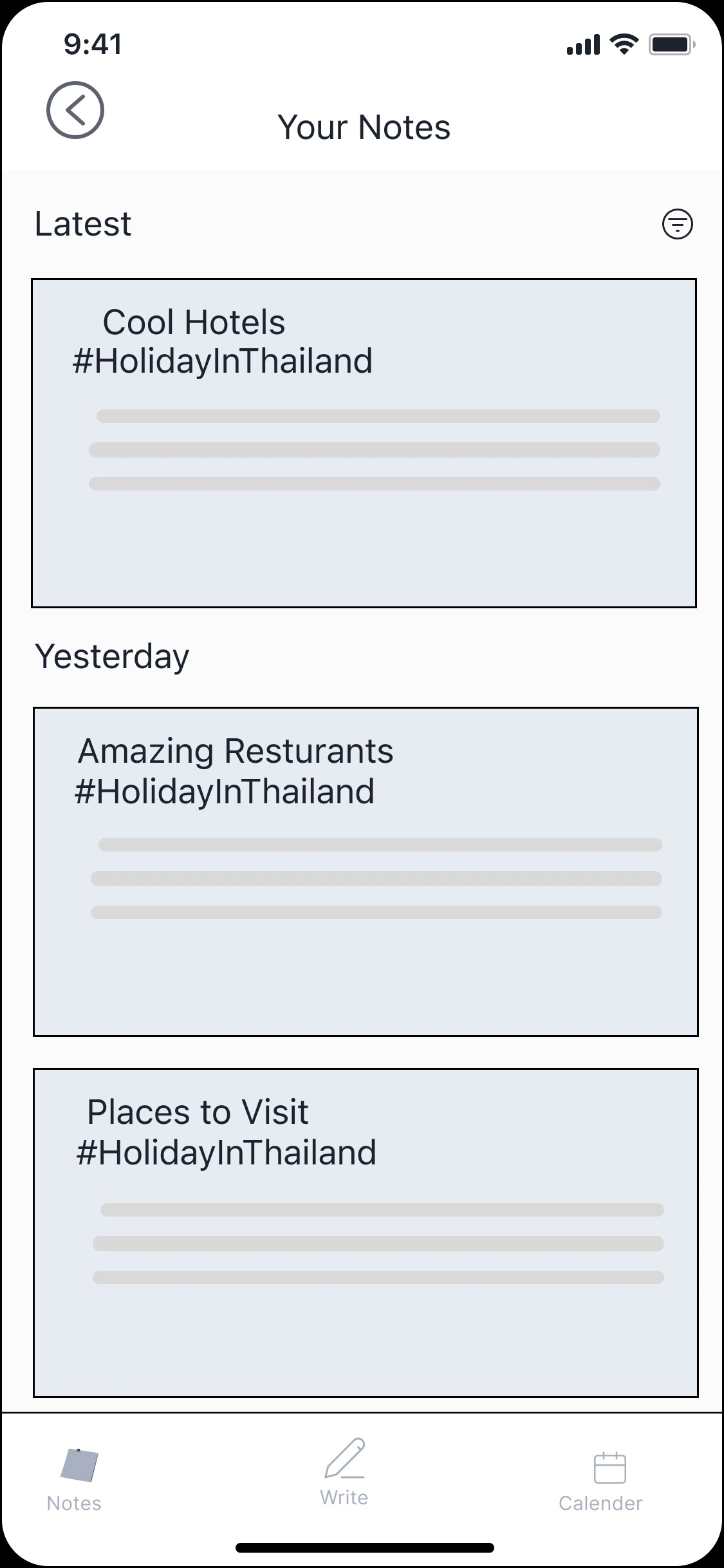
Same shade, same tag, in date order
Drill into one thread and every entry that shares its colour and hashtag lines up by date — Latest, then Yesterday. Old notes aren’t clutter; they’re a chain of thought you can follow back.
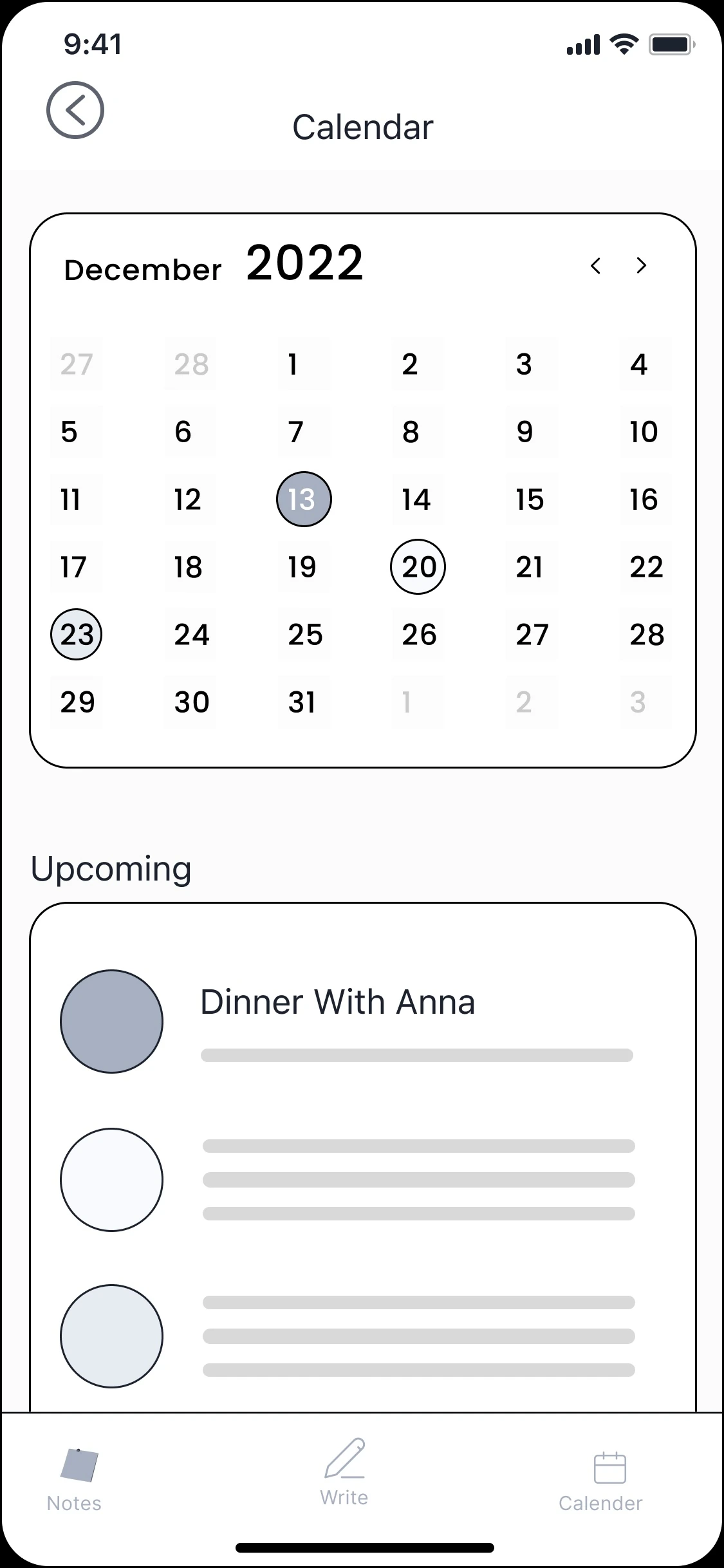
A calendar built from notes only
The calendar populates from note entries.
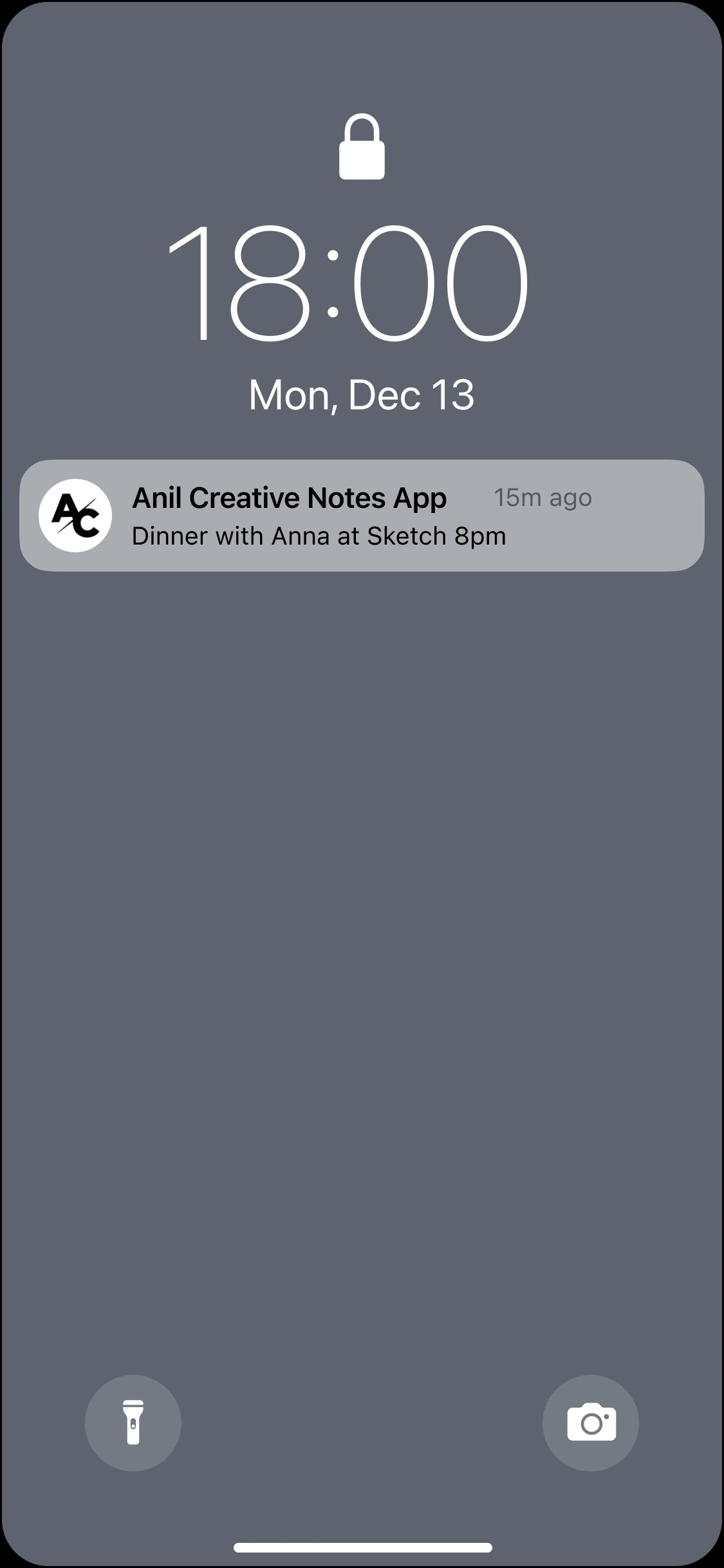
It resurfaces when it’s relevant
The note you wrote returns at the right moment — “Dinner with Anna at Sketch 8pm” on the lock screen. Trusted surfacing, no daily checking.
Five Calls That Shaped the Product
Not a feature list — five judgement calls, each traceable straight back to a person. A quote, a habit, or a constraint sits under every one.
Open on a blank canvas, not an index
Every notes app opens on a wall of everything you haven’t dealt with yet. Not very Zen. Christina’s job to be done was tranquillity — so the first thing you see is a place to write, never a list of obligations.
Visual cards, not an endless list
The seed was Eva, nostalgic for a rediscovered stickies app. Sam was already living in Google Keep for the same reason — so notes surface as scannable cards you read by colour, not as one long scroll of text.
“It’s a bit more visual, that’s how I think.”
A calendar built from notes only
The Calendar Paradox’s answer, made concrete: entries are born from notes, always optional, and silent unless you asked for them. Trusted surfacing — without the nagging.
Archive, don’t delete
Her original flow ended in collate then archive, never delete. Old notes aren’t clutter to clear — they’re a chain of thought you can follow back.
“I like to archive things. I like collecting, but I also like to be organised.”
Embrace the constraint
The mandated greyscale turned out to be a hidden gift — it enforced the very calm the product promised. And the chakra colour-coding from my first sketches sits ready, the moment the constraint lifts.
Testing & Iteration
The honest version of how the design got here:
Initial idea → hand-drawn wireframes → digital wireframes → clickable prototype. Then ten people sat down with it — and remember, no onboarding screens were permitted, so the interface had no choice but to teach itself. Task-based testing, one question underneath: can a stranger complete the core flow unaided — name a note, save it, work out what type and tag it saves under, find it again, and find a dated event on the calendar?
All ten completed it. But how they got there is where the learning was.
“It’s like you wanna make a note.”
Georgia · usability test, unprompted
The friction was always the same, and it was telling. The testers who hesitated did so at the same spot, for the same reason: muscle memory from Apple Notes. Martina went to tap “back” to save, the way her usual app works, before finding the button — “I think I’m used to the Notes app on the phone, that I just go back that way… instinct, I just went there.” On the second pass she’d have changed nothing: “No, I think it makes sense. It’s just a case of knowing where everything is.” The signal wasn’t that the flow was wrong — it was that anything competing with an ingrained habit has to be more visible, not just present. That confirmed a call the brief had already forced: with onboarding banned, the hidden swipe couldn’t teach itself, so it had become a visible button on the note’s edge — testing simply proved the instinct right.
What landed without prompting was the thing the whole project was built on. Georgia, comparing it to her usual notes app: “It’s a little more personal… I’m a very visual person, so it feels like it’s more of a creative kind of diary style, rather than just a quick note that’s dull and boring in the back of your phone.” Then, unprompted: “It’s like you wanna make a note.” That’s the tranquillity thesis, confirmed by a stranger — note-taking reframed as something you’d want to do, not a chore.
Martina echoed the mechanics that carry it: on the colour-coded calendar entries, “you can colour-code your events, and it’s gonna show up on your calendar with the same colour… clear to see”; on the grouping, “really cool that you can see previous notes and just find them clearly”; and on the restraint, “I do like that it’s pretty simple and minimal… you can just focus on what you have to write down.”
And the honest tension worth naming: one tester asked for the very thing the brief forbade. Martina, on first use, wanted onboarding — “usually when it’s a new app, you have tutorials… that would help.” The constraint said no onboarding, so the design had to absorb that demand by being self-evident instead. That she completed every task anyway is the answer to her own request.
Ten for ten, with no colour and no onboarding to lean on. The information architecture held, even in grey.
And the suggestion I logged for the next development round: independent calendar entries — letting users create a calendar item without a parent note, for the moments that really are just appointments.
Below is how I overcame the no-onboarding issue — a gesture-based swipe menu can’t announce itself without onboarding, so I added a visible menu button on the note’s edge.
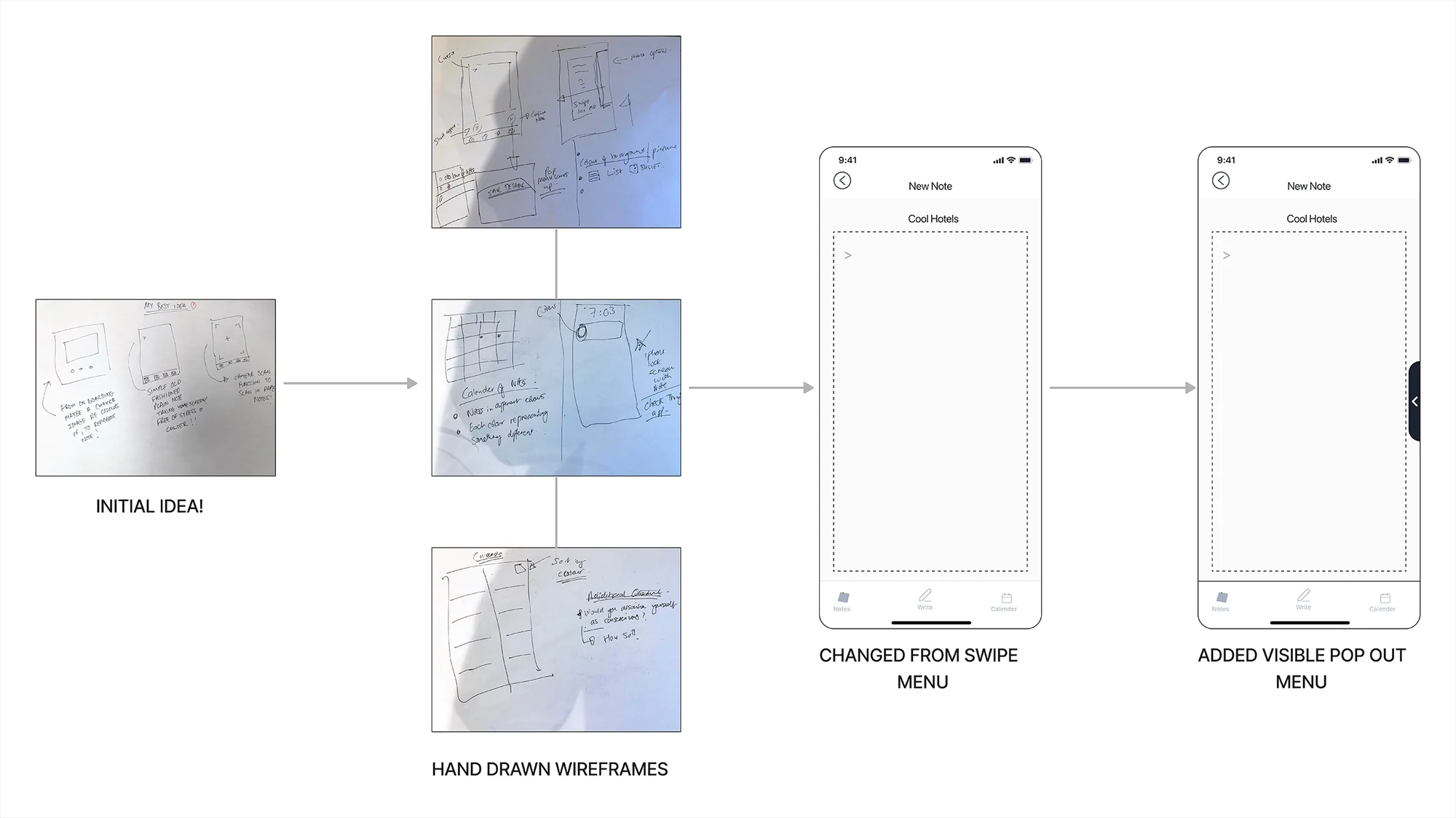
Further Exploration: The Addiction Parallel
One thread I’d pull on, given more time. As someone who gave up smoking, I kept recognising the shape of my users’ behaviour. Stripped right down, smoking runs on two beats. The first cigarettes are pleasure: nicotine reaches the brain in seconds and sets off a surge of dopamine — a real lift, a moment of calm. But it fades fast, and as it clears the body slips into a low withdrawal — a restless, irritable discomfort. The next cigarette settles that discomfort, and the relief lasts only until it builds again. That’s the whole loop. What shifts over time is which beat you’re chasing: it begins as reaching for the pleasure and quietly becomes reaching to relieve the discomfort the habit itself now creates.
Capturing a note has the same shape, in a gentler key. A thought arrives and won’t settle — a small pressure, a worry it’ll be lost. You write it down, and the pressure lifts: the relief is real, and my interviewees described it plainly. It holds until the next thought arrives, and then you reach for the note again. “Once I write my list, I feel like it’s under control” is that exhale — the same exhale a cigarette once gave me. I’m not claiming the two are equivalent; a note carries none of nicotine’s chemistry. What they share is the loop: tension, then relief, then tension again.
The same two-beat loop
Relieve the tension the habit itself creates — then watch it build again
Two nodes, one loop. No third stage, and no retrieval. Finding the note again later is a separate errand — like going out to buy cigarettes — not part of the relief cycle, so it stays out of the picture.
The original
Smoking
Stripped to its loop.
Withdrawal builds the tension
Nicotine leaves the system. A low, restless discomfort rises — the body asking for the thing it’s adapted to.
Smoking relieves it
You light up. Dopamine rises and the discomfort quiets — that’s the payoff. Early on it reads as pleasure; in the habit it becomes mostly relief from a tension the habit itself created.
The parallel
Capturing a note
The behaviour I watched, on the same loop.
An un-captured thought builds the tension
A thought arrives and won’t settle: don’t lose this. A small mental pressure rises and sits there.
Capture relieves it
You write it down. The mind offloads the worry and clears — that’s the payoff. A small lift, then relief from a tension the un-captured thought created.
“Once I write my list, I feel like it’s under control.”Christina (Eva) — observed in interview
Reflection
Five things this project taught me — and the one shift that wasn’t about design at all.
The process did the heavy lifting
A required deliverable — the hand-sketched user flow — is what stopped me building a productivity app nobody asked for. Mapping what users actually do beat asking them what they want.
The word is something you distil, not something you’re handed
Christina never asked for “a mindfulness app,” and she never said “tranquil” either — that word was mine. I had to digest the transcripts, connect them, feel it, and encapsulate it in a single word. That became the job to be done — and everything followed from taking it seriously.
Opposite needs can share one optional feature
Eva (Christina) wanted no calendar — she disliked reminders and a phone pinging all day. In 1b, both Sam and Claus were the opposite: they leaned on calendar reminders because they didn’t trust their notes to resurface anything. Rather than pick a side, I made the calendar optional and built entirely from notes — reliable for Sam and Claus, silent and opt-in for Eva (Christina). One feature served both, which is exactly why Eva (Christina) could fold into the Amy persona without contradiction.
Ruling people out is research too
Three of my six interviewees were satisfied, productivity-leaning, ecosystem-locked users — and one of them still handed me the strongest confirmation that the mindful need exists. Excluding them sharpened the target instead of watering the product down to chase everyone.
If I ran it again
I’d add diary studies to catch when and where capture really happens, follow the addiction parallel properly — tracking whether the capture loop ever tips from healthy relief into something compulsive — and re-interview users weeks after launch to see whether the anxiety relief holds.
See It Move
-
01
A blank note, on purpose
It opens on an empty “Cool Hotels” note — no tutorial, no walkthrough. The brief banned onboarding, so the canvas had to explain itself.
-
02
The toolbar, a tap away
A button on the right edge opens the tools — text, list, image, save. Visible by design: with onboarding banned, nothing could rely on a hidden gesture.
-
03
Save with meaning
The Save panel does the real work: assign a type (Self, Event, Home…), apply or create a tag, and attach a calendar entry. A note stops being just text.
-
04
A note becomes a commitment
That tagged note surfaces in the library and list views, then lands on the calendar as “Dinner With Anna” — the calendar paradox, solved in one continuous flow.
-
05
The reminder closes the loop
Your calendar entry on the lock screen — reliably back, right when it matters.
The Final Twist: Try It for Yourself
They think it’s all over… it is now! Years after this project wrapped in 2022, I decided to vibe code Zen Notes into existence as a limited demo — so you can stop reading about it and try it for yourself. In greyscale, of course — it would be rude not to!
Tap the cover to enter, write a note, toggle fonts from the side menu if you fancy, then save it with a type and a tag. Watch it appear in the notes section — coloured and hashtagged — and, if you set a reminder, on the calendar too.
Interactive demo · resets on refresh